Canva is one of the most powerful design tools available today — and the good news for students is that you do not always have to pay for it. Canva officially offers free access to premium features through multiple programs designed specifically for students and educators.
This guide covers every legitimate, official method to get Canva Pro free in 2026 — no workarounds, no policy violations, and no risk to your account.
What Is Canva Pro and Why Do Students Want It?
Canva is a free online design tool used by millions of people worldwide for creating presentations, posters, resumes, social media content, and much more. While the free version is genuinely useful, Canva Pro unlocks a significantly larger set of tools that students find valuable for academic and creative work.
With Canva Pro, students get access to over 100 million premium photos, videos, graphics, and fonts. The one-click background remover alone saves hours of editing time. Magic Resize lets you instantly reformat any design for different platforms. AI-powered tools including Magic Write and Magic Design help you generate content and layouts in seconds. On top of that, you get 1TB of cloud storage and real-time collaboration features that are ideal for group projects.
The question most students ask is simple: is there any way to access all of this without paying the monthly subscription fee? The answer is yes — through Canva’s own official programs.
Method 1 — Canva for Education (Best for K-12 Students)
Canva for Education is Canva’s official free program for primary and secondary school students and their teachers. Canva Education is 100% free for K-12 (primary and secondary) teachers and their students, powering creation and collaboration in every classroom.
If you are a primary or secondary student, your teacher needs to invite you to join Canva Education. They can do this from their Canva Education account.
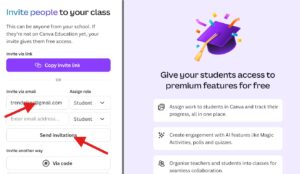
Here is how it works for K-12 students:
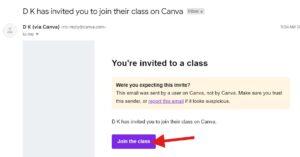
Your teacher first signs up for a verified Canva Education account using their school email address. Once their account is approved — which can happen instantly with a verified school domain — they invite students to their Canva classroom. Students accept the invite and immediately get full access to Canva’s premium features, completely free.
If your teacher has not yet set up a Canva Education account, ask them to visit canva.com/education and register. The process takes less than 10 minutes and approval can be instant for verified school email domains.
Important note: Canva Education is currently available for K-12 (primary or secondary) teachers and institutions. It is not currently available for higher education teachers and institutions such as colleges and universities.
Method 2 — Canva for Campus (For College and University Students)
College and university students have their own dedicated program called Canva for Campus. This is separate from Canva Education and is designed specifically for higher education institutions.
Student access to Canva is managed by your school or university. If they offer Canva for Campus, you may be able to access Pro and premium features for free.
The simplest first step is to try signing in to Canva using your official university or college email address. Many universities have direct partnerships with Canva, which means students with a valid institutional email address — such as a .edu address — get instant free access to premium features without any additional steps.
If your university is not yet a Canva for Campus partner, contact your school’s IT department or student services office and ask them to apply. Once a university joins the program, all students on campus can access Canva’s premium tools at no individual cost.
Once your institution purchases a certain number of licenses based on total student body size, the entire student cohort gets access, 100% free.
Method 3 — Canva’s Official 30-Day Free Trial
If neither of the education programs applies to your situation, Canva offers an official 30-day free trial of Canva Pro. This gives you full access to every premium feature for an entire month — no restrictions.
To use the free trial responsibly, visit Canva’s official pricing page at canva.com/pricing and select the “Try Canva Pro free” option. You will need to enter a payment method, but you will not be charged anything during the 30-day trial period. You can cancel at any time before the trial ends to avoid any charges.
This is the cleanest option for students who need Pro features for a specific short-term project — a major presentation, a final portfolio, or a scholarship application — and do not need ongoing access afterward.
Method 4 — Canva for Nonprofits (For Eligible Student Organizations)
If you run or are part of a registered nonprofit student organization, Canva offers free Pro access to qualifying nonprofits through its official nonprofit program. Student clubs and organizations that hold formal nonprofit status may be eligible to apply.
Visit canva.com/canva-for-nonprofits to check eligibility guidelines and submit an application. Approval typically takes a few business days and gives the entire organization access to Canva Pro features at no cost.
Canva Free vs Canva Pro — What Is the Actual Difference?
Understanding what you gain from the upgrade helps you decide which method to pursue.
With the free version of Canva you get access to thousands of free templates, basic design elements, and up to 5GB of cloud storage. It is genuinely capable for everyday design work.
Canva Pro adds over 100 million premium photos, videos, graphics, and fonts. It includes over 80,000 additional premium templates, one-click background removal, Magic Resize for instantly reformatting designs across platforms, the full Magic Studio suite of AI tools, real-time team collaboration, 1TB of secure cloud storage, and LMS integration with platforms like Google Classroom, Canvas, Microsoft Teams, and Blackboard.
For students working on frequent design projects, the difference in capability is significant.
Canva’s Official Account Types in 2026
| Account Type | Who It Is For | Cost |
|---|---|---|
| Canva Free | Anyone — general public | Free |
| Canva Pro | Individual paid users | Paid monthly or annually |
| Canva for Education | Verified K-12 teachers and their students | 100% Free |
| Canva for Campus | College and university students via institution | Free via institution |
| Canva for Teams / Enterprise | Businesses and organizations | Paid |
| Canva for Nonprofits | Registered nonprofit organizations | Free with approval |
Which Method Should You Use?
If you are a K-12 student, ask your teacher to set up a Canva Education classroom — it is the fastest and most straightforward path to free Pro access.
And if you are a college or university student, try logging in with your institutional email first. If that does not work, contact your school’s IT or student services team about Canva for Campus.
If you need Pro features urgently for a short-term project, the official 30-day free trial is your cleanest option with zero risk if you cancel before it ends.
Canva has built these programs specifically because they believe every student deserves access to professional design tools. Taking advantage of the official programs is the right approach — it protects your account, respects the platform’s policies, and gives you stable, reliable access without worrying about losing it unexpectedly.
For the most up-to-date eligibility information, always refer to Canva’s official education page at canva.com/education.
This article is for informational purposes only. Eligibility for Canva’s education programs is determined solely by Canva based on their official guidelines. Visit canva.com for current program details.

Meet Deepkant Shrivastava, he has been writing content since 2020. Over the years he has worked across more than ten websites — mostly covering job updates, career guidance, and government schemes — which gave him a solid grip on how to break down complicated topics for everyday readers.
At NextExamNews, he writes guides, exam updates, and result-related articles covering major about various exams. He tries to keep every article easy to read and straight to the point.
On the personal side, he is currently in performance marketing domain and learning AI and finding ways to bring both into his content creation.