Quick Answer
Yes — Canva Pro is free for students in 2026 through official programs. K-12 students get free access through Canva for Education when their teacher sets up a classroom. College and university students can get free access through Canva for Campus by signing in with their .edu email. Everyone else can use the official 30-day free trial — no charge if cancelled before it ends.
Canva Pro costs $15 a month in 2026. For most students, that is money better spent elsewhere.
The good news is that Canva has built official free programs specifically for students — and they actually work. No workarounds, no sketchy invite links, no risk of getting your account banned. Just legitimate, official access through programs Canva has designed for exactly your situation.
Here are the four ways that work in 2026, and which one is right for you.
First — Know Which Program Applies to You
Not every program works for every student. The fastest way to get free Canva Pro is to match yourself to the right program from the start.
| Who You Are | Right Program | Cost |
|---|---|---|
| K-12 student (grades K–12) | Canva for Education | Free |
| College / University student | Canva for Campus | Free (if school enrolled) |
| Any student — short term need | 30-Day Free Trial | Free (cancel before day 30) |
| Student nonprofit org leader | Canva for Nonprofits | Free (with verification) |
Way 1 — Canva for Education (Best for K-12 Students)
Canva for Education is available to K-12 teachers and students at eligible schools — completely free.
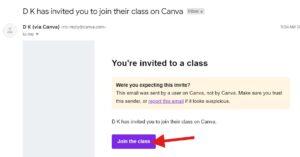
If you are in grades K through 12 anywhere in the United States, this is your path. Your teacher sets up the classroom account, and you get full Canva Pro access automatically once they invite you.
As a student, you cannot sign up for Canva for Education directly. Student invitations are managed from within a teacher’s account settings — teachers invite students through embeddable links, Google Classroom imports, or direct email invitations.
So what do you actually do? Ask your teacher.
If your teacher has not set up Canva for Education yet, point them to canva.com/education. Canva for Education is FERPA and COPPA compliant and supports integration with Google Classroom, Canvas, Schoology, Classlink, PowerSchool, and many other tools schools already use. Setup typically takes under 15 minutes for a teacher.
Once your teacher invites you, your account upgrades automatically. You get:
- Access to 100 million+ premium photos, videos, and graphics
- Background remover — one click, no Photoshop needed
- Magic Resize for all formats and platforms
- AI tools including Magic Write and Magic Design
- Thousands of premium presentation templates
- Real-time collaboration with classmates
- 1TB of cloud storage
One important note for parents: parental consent is required before a teacher can invite a student below 13 years of age to use the platform.
>> Check Steps and Get Team Link
Way 2 — Canva for Campus (Best for College Students)
If you are in college or university, Canva for Education does not apply to you. Canva for Education only covers K-12 schools. University students should check if their institution offers Canva for Campus.
Canva for Campus is the higher education version of the program. The difference is that your university has to be enrolled — but if they are, you get free Pro access simply by signing in with your school email.
Many colleges have signed up, including UCLA, Dartmouth, and Texas State. The list grows every year as more institutions partner with Canva.
Here is how to check in two minutes:
Step 1 — Go to canva.com and click “Sign up.”
Step 2 — Use your official college email address — the one ending in .edu — to create or log into your account.
Step 3 — If your university is enrolled in Canva for Campus, your account will automatically show Pro features. You will see the crown icon in the top right corner of your dashboard.
If that does not work, your next step is to check your university’s IT portal or student resources page for “Canva.” If neither works, email your institution’s IT or digital learning department to ask whether they offer Canva for Campus.
If your university has a partnership with Canva, you get instant free Canva Pro for student access without any manual review. If not, your school’s IT department can apply — and once approved, every student at the institution gets access.
Way 3 — Official 30-Day Free Trial (Works for Everyone)
If neither of the education programs applies to your situation, the official Canva Pro free trial is a legitimate option for any student who needs Pro features for a specific project.
The 30-day free trial gives you full access to Canva Pro for one month — including the background remover, Magic Resize, advanced exports, Brand Kit features, and AI tools. You can cancel before the trial ends at no charge.
You will need to enter a payment method to start the trial, but nothing is charged until day 31. Set a reminder on day 29 to cancel if you do not want to continue paying.
This is the best option for students who:
- Need Pro features for one major project — a senior capstone, college application portfolio, or scholarship presentation
- Are not K-12 students and whose university is not enrolled in Canva for Campus
- Want to test Pro features before deciding whether to pay for a subscription
One important note: you cannot keep using different email addresses to restart the trial — Canva asks for payment details each time, and repeat trial accounts are detected and flagged. Use it once, use it well.
Way 4 — Canva for Nonprofits (For Student Organization Leaders)
If you run or are a key member of a registered student nonprofit organization, Canva has a free program for that too.
Canva for Nonprofits is available to registered 501(c)(3) organizations in the US. If you work for a legitimate nonprofit, this program gives you free Canva Pro for up to 50 team members, indefinitely.
Student organizations that hold formal 501(c)(3) status — community service clubs, registered advocacy groups, some campus chapters of national organizations — may qualify. Political organizations, government entities, and K-12 schools are not eligible through this program.
To apply, visit canva.com/canva-for-nonprofits. Verification is handled through Canva’s partner Goodstack and typically takes a few business days.
What Canva Pro Actually Gives You
Here is the difference between Canva Free and Canva Pro — so you know whether it is worth pursuing:
| Feature | Canva Free | Canva Pro |
|---|---|---|
| Templates | 1.6 million+ | 3.6 million+ premium |
| Stock photos, videos, graphics | 4.7 million+ | 100 million+ |
| Background remover | ❌ Not available | ✅ One click |
| Magic Resize | ❌ Not available | ✅ All formats |
| AI tools (Magic Write, Design) | Limited | ✅ Full access |
| Brand Kit | ❌ Not available | ✅ Up to 5 kits |
| Cloud storage | 5GB | 1TB |
| Transparent PNG export | ❌ Not available | ✅ Available |
| Price | $0 | $15/month |
For most student projects — class presentations, posters, social media graphics for clubs — Canva Free is genuinely capable. If you specifically need the background remover, Magic Resize, or access to premium templates for a professional-looking output, that is when Pro makes a real difference.
What Does NOT Work in 2026 — Avoid These
Several methods that used to work for getting free Canva Pro no longer do in 2026.
The GitHub Student Developer Pack previously included Canva Pro as a benefit. That benefit has been discontinued. If you have seen older articles recommending this method, it no longer works.
Publicly shared team invite links — often posted in Facebook groups, Reddit threads, or Telegram channels — violate Canva’s Terms of Service. Canva has been cracking down on billing-address mismatches and unauthorized account sharing. If you get flagged, you risk a permanent ban and losing all your designs. It is not worth the risk when legitimate free programs exist.
VPN tricks to access regional free offers also carry the same account ban risk and are not reliable in 2026.
>> Check Steps and Get Team Link
Frequently Asked Questions
Is Canva Pro free for students in 2026?
Yes — through official programs. K-12 students get free access through Canva for Education when a teacher invites them. College students can access free Pro features through Canva for Campus if their university is enrolled. Everyone can use the 30-day free trial once at no charge.
Can I get Canva Pro free with my .edu email?
If your university has partnered with Canva for Campus, signing in with your .edu email gives you instant free Canva Pro access without any manual review. Try it first — sign into canva.com with your school email and check whether the Pro crown appears on your dashboard.
Does Canva for Education work for college students?
No. Canva for Education is currently available for K-12 primary and secondary students only. College and university students should check for Canva for Campus through their institution instead.
Can a student sign up for Canva for Education directly?
No — school students cannot sign up for Canva for Education directly. Access is provided through an invitation from a teacher’s account. If your teacher has not set up a Canva classroom yet, ask them to visit canva.com/education to get started.
What if my university is not enrolled in Canva for Campus?
Email your institution’s IT or digital learning department to ask whether they offer Canva for Campus or have plans to enroll. If enough students ask, universities often act on it. In the meantime, the 30-day free trial is your best option.
Is the Canva 30-day free trial really free?
Yes — as long as you cancel before day 30. You need to enter a payment method to start, but nothing is charged during the trial period. Set a reminder on day 29 to ensure you cancel before payment is taken.
Does Canva Pro work for school projects and assignments?
Canva Pro gives students access to premium templates, AI tools, background remover, Magic Resize, and real-time collaboration — all of which are genuinely useful for class presentations, group projects, college application materials, and resume design.
Bottom Line
You do not need to pay $15 a month for Canva Pro as a student in 2026.
If you are in K-12, ask your teacher to set up a Canva for Education classroom — it takes them less than 15 minutes and you get full Pro access immediately.
If you are in college, try signing in to Canva with your .edu email right now. If your university is enrolled in Canva for Campus, you are already done. If not, contact your IT department and use the 30-day free trial while you wait.
The programs exist. They are free. They work. Use them.
Official Links:
- Canva for Education (K-12): canva.com/education
- Canva for Students page: canva.com/education/students
- Canva for Nonprofits: canva.com/canva-for-nonprofits
- Canva Pro Free Trial: canva.com/pricing

Meet Deepkant Shrivastava, he has been writing content since 2020. Over the years he has worked across more than ten websites — mostly covering job updates, career guidance, and government schemes — which gave him a solid grip on how to break down complicated topics for everyday readers.
At NextExamNews, he writes guides, exam updates, and result-related articles covering major about various exams. He tries to keep every article easy to read and straight to the point.
On the personal side, he is currently in performance marketing domain and learning AI and finding ways to bring both into his content creation.